

Nol Card Balance Check: Have you ever faced a situation where you have been embarrassed after hopping on the bus, tram or Dubai Metro and felt that the balance is gone while paying the fare at the end of the ride? So, checking your NOL card is excessively straightforward if you comply with the appropriate steps. If you want to check your card, then this article may be an ideal companion that guides you through the right path.

This article will guide you in-depth through everything you need to know about checking your card through distinct methods, such as the RTA website, the Nol app, via SMS, at metro stations, or even at merchant stores. So, without further ado, let’s dive into prime topic!
Must Read: How to Check Travel Ban in UAE (Explained Guide 2025)What is Nol Card?
The Nol card is an online fare payment instruction pertaining with the prominent Road and Transport Authority (RTA). The card is often utilised for paying the fare for the Bus, tram and Dubai Metro.
RTA Dubai Nol Card Balance Check Online 2025
Before moving on, there are several ways to check the Nol Card balance online. Here is the complete step-by-step guide on how to check Nol card balance, which is as follows:
Balance check for Nol card through RTA portal
The Road and Transport Authority (RTA) has streamlined the variety of services apart from the RTA website balance check. Subsequently, it also allows people to top up their NOL cards. Here’s how you can do your balance check for the NOL card through the RTA portal:
- Step 1: Visit Road and Transport Authority (RTA) official website.
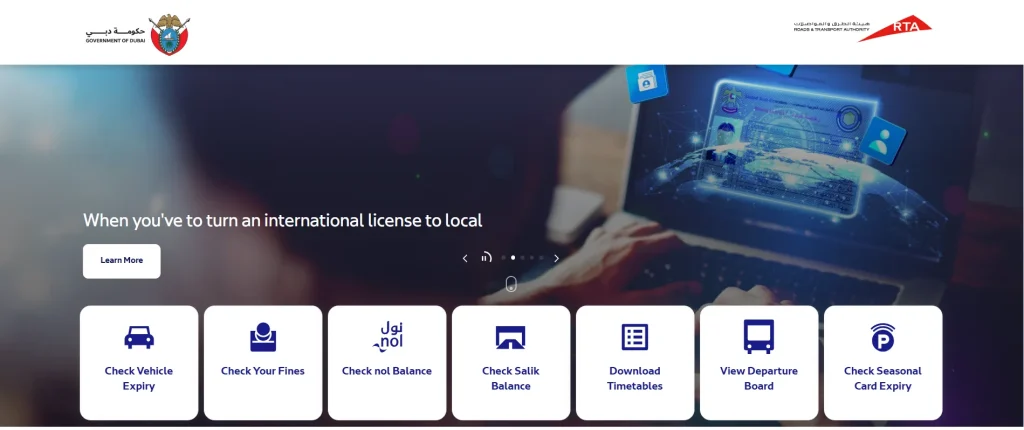
- Step 2: Click on “Check Nol Balance“.
- Step 3: Enter your “Tag ID“.
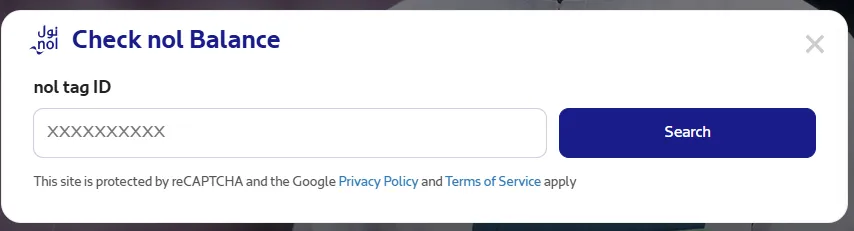
- Step 4: Click on the “Search” button.
- Step 5: After that the system will display your pending credit and expiry date.
Check NOL Card Balance Via the NOL How- RTA
- Step 1: Go to the “Nol How Portal” by RTA.
- Step 2: Input your “nol tag ID” in the designated box.
- Step 3: Now yow will show the “Card Balance” and “Credit” on your screen.
NOL Card Balance Check Using the NOL App
The NOL App represented with delivering the multiple service. The app is easily accessable at Google play Store and App Store as well as Huwaii Store. Here I have articulate the steps on how to check your Nol Card balance on the Nol App, which are as follows:
- Step 1: Download and Install the NOL App at “Google Play Store” and “App Store” as well as “Huwaei Store“.
- Step 2: Navigate the app and “log in” with your registered account.
- Step 3: Click on “My Cards” section.
- Step 4: Now select the Nol Card which you want top check.
- Step 5: You will be displayed your current balance on the screen.
Nol Card Balance Check Offline Using the SMS
Checking through the SMS is a handy and convienent option which is done with in just minutes. Here’s how:
- Open your messege section and compose a New SMS.
- Type your 14-digit number given back of your nol card.
- Check once and send to “511.”
- Wait for a while and you will see your Nol card status.
Also Read: Efficient Corporate Bus Hire Dubai –From Airport Transfers to City ToursCheck NOL Card History
You can also address your NOL Card History with in just step. Here are a step by step points:
- Head to the RTA website.
- Hop on the “nol Card Transaction History” section.
- Enter your nol tag ID in the designated field.
- Complete the human verification process.
- Click the “Next” button to see your current transaction and may be Nol card balance expiry date.
Check Nol Balance at Bus Stations Or Metro Station
- First and foremost, you have to reach the nearest Bus Stations Or Metro Station.
- Discover the vending machine which usually instaled in the congested areas.
- Insert your card into the designated slot.
- Now select the “Check Balance” option.
- After all, the machine will showcase the Nol Card balance.
- Now, you can pull out your card from the slot.
RTA Nol Card Balance Check at Merchant Shops
If you don’t able to check your balance through this medium, then Merchant Shops is a convienent and seamless to get information at Merchant Shops.
- Go to the any shops associated with the RTA.
- Inquire with the cashier about checking your Nol Card balance.
- Deliver your Nol card to them.
- After some time, they will provide all the information about your NOL card status.
FAQs
What is Nol tag ID?
The Nol Tag ID is a 14-digit number that is printed on the back of the Nol card.
What is minimum top up for Nol card?
Individuals cannot have less than AED 7.50 on their NOL card.
Conclusion
Checking your Nol card balance is straightforward and convenient, offering numerous options, including the RTA website, Nol app, SMS, metro stations, and merchant outlets. RTA customer service assists with balance inquiries and card replacement, empowering efficient navigation through Dubai’s transport system.